Early access · For owners, operations leads and consultants
Your whole business on one map
Draw your departments, processes and the tools behind them, so everyone knows what to do and who owns each step without calling you.
- Claude draws it from one request
- Arabic or English content
- Version history and restore

From the whole company down to one checklist
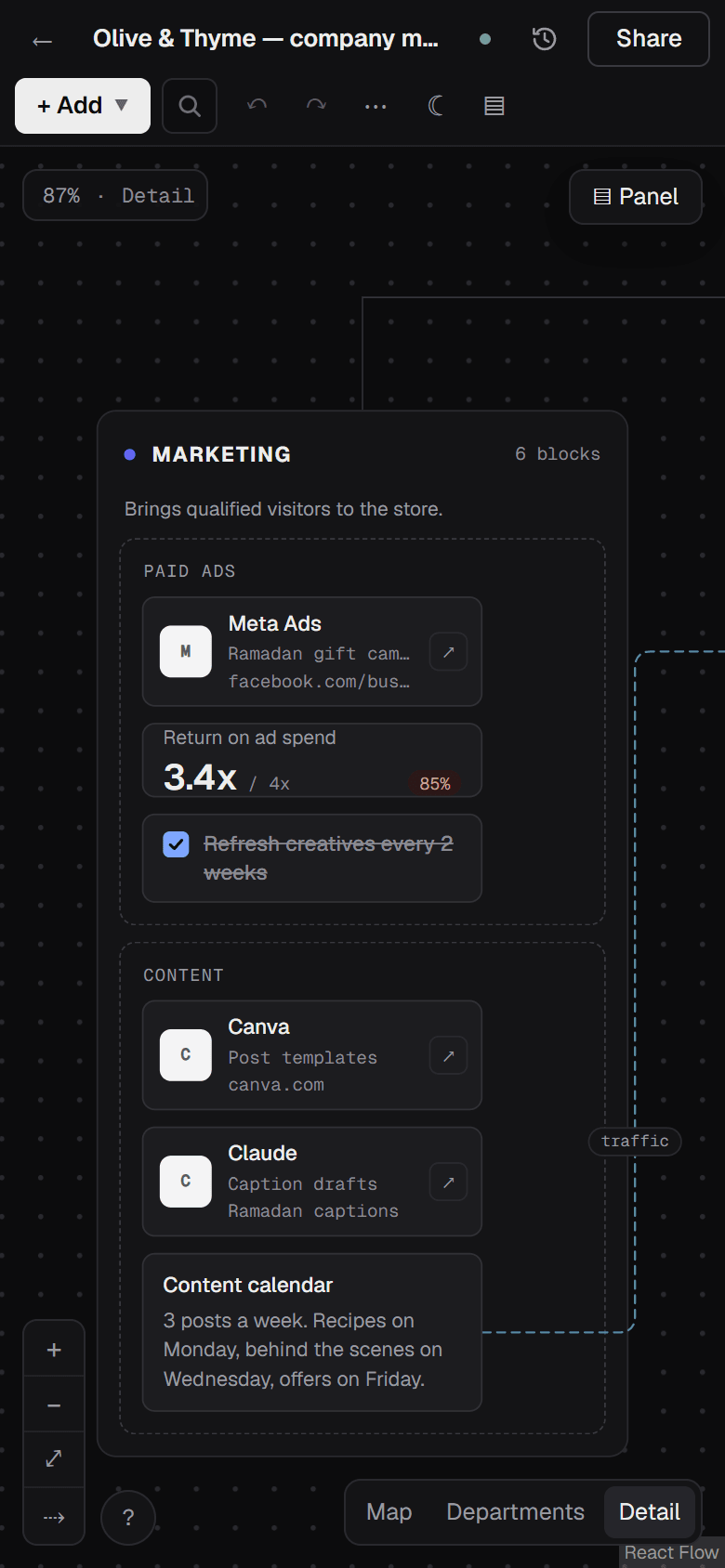
Real screenshots from the app, using a sample online store. Switch between the three views the same way you do inside it.
The whole picture: the company at the top, its departments underneath, and how much sits in each.
Each department with its processes and tools. Arrows show how work moves from one team to the next.
Every card, checklist and KPI, with a link to the tool the work happens in and the target it's measured against.
If you were away for a week, would your team know how the work gets done?
TodayEvery question about a step, a tool or who owns what ends with a call to you, holiday or not.
With the mapYou send the map link. The step is written down, next to its tool and the person who owns it.
TodayProcesses are spread across docs, WhatsApp chats and spreadsheets, and new hires piece them together by asking around.
With the mapOne place that starts at the whole company and ends at a checklist in one team, which a new hire can read before day one.
TodayYou pay for a CRM, ad accounts and AI tools, and can't say which team uses which.
With the mapEach tool shows up where it is used, with its link for that spot and the links used there before.
Claude · MCP
Ask Claude to draw a department, and find it on your canvas
We gave Claude the request below, and it built the map underneath through the Business Blueprint connection: five stages from lead source to weekly review, with their tools, KPIs and the arrows between them. The numbers are examples for you to replace, and everything stays editable on the canvas.
The request
Map my sales department: where leads come from, the steps from first contact to close, the tools we use at each step, and the KPIs we review every week.
To connect, create a personal token in Settings and add it to Claude Desktop or Cowork. Claude can then read your maps, build new ones and edit existing ones.
What the map holds
Click any screenshot to enlarge it
Know which tool each team uses, and where to open it
Your company's tools sit in one library: CRM, ad accounts, email, Claude, ChatGPT. Wherever a tool appears on the map it keeps its own link for that spot, such as the exact Claude conversation that drafts marketing captions, plus a history of links used with it.
- Claude as a tool inside Marketing
- Its link for this exact spot
- Links used with it before
Put the target next to the work that hits it
Cards, checklists and KPIs with a current value, a target and a unit, inside the team that owns them. Here the conversion rate (2.1% against a 3% target) sits right where the store work happens.
- A KPI: current value against target
- An arrow that names the relation
- A checklist inside the team
Try a change. The old version stays one click away
Autosaved revisions, versions you name yourself (like "Ramadan plan"), a comparison of two versions, and restore. Reorganise a whole department knowing you can go back.
Arrows that say what connects two parts
Flows to, feeds, triggers and more. An arrow can carry a label and run one way or both, so you see what depends on what.
Your team on the same canvas
Invite members with roles, see who is working with you right now, and assign any block to a named person.
Read-only links
Send the map to an advisor, a partner or a new hire before day one. They see it as it is and can't change it.
Arabic or English, and your file goes with you
Write in Arabic, English or both. Export any map as a JSON file and import it again whenever you like.
Who it's for
Stop explaining the same thing every week
Draw the company the way you run it today and get it out of your head. When someone asks "how do we do this?", send them the map link.
See every process and who owns it
See each department's processes, tools and the owner of each step. Try a change to how work flows, compare the two versions, and restore the old one if it doesn't hold up.
Map how each client's business runs
Give each client their own workspace and map. Start from a starter map or ask Claude for a draft, then hand over a read-only link or invite their team to carry it on.
Why not a whiteboard, a doc or a spreadsheet?
Each is good at what it was built for. Here is what changes when the job is mapping how a business runs.
| What you need | Business Blueprint | Whiteboard | Docs or wiki | Spreadsheet |
|---|---|---|---|---|
| Company, then departments, processes and tasks | Built in, with three zoom levels | You draw it with free shapes | Pages and subpages | Rows and tabs |
| A tool's own link wherever it is used, with link history | Yes | A link pasted as text | A link pasted as text | A link in a cell |
| Arrows that name the relation: feeds, triggers, reports to | Built-in types, with labels | Arrows you label by hand | Described in words | Described in words |
| A KPI with its value and target, inside the team that owns it | KPI block with value, target and unit | A number typed as text | A table on the page | Yes, it's what spreadsheets do best |
| Claude draws and edits it from a written request | Through the Claude connection (MCP) | Depends on the product | Depends on the product | Depends on the product |
What happens after you join
You leave your email
One field, and we don't ask for a card.
Your invite arrives by email
When your turn comes, we send you a link into the app.
You start your first map
From a blank canvas, a starter map, or one request to Claude.
Every screenshot on this page is from the app as it works today. The app's own interface is in English for now, and anything you write in Arabic displays right to left.
FAQ
Who is Business Blueprint for?
Owners and operations leads at small and mid-size businesses, and the consultants and agencies who design how companies run. If you often explain how your company works to other people, the map saves you repeating it.
What do I need to use it with Claude?
Claude Desktop or Cowork, plus a personal token you create in your Business Blueprint settings. Claude is optional: you can draw the whole map yourself.
Can my team work on it with me?
Yes. Invite members to a workspace, give each one a role, and see each other live on the map. You can assign any block to a person. For people outside the team, share a read-only link.
Does it support Arabic?
For your content, yes: write your maps in Arabic, English or both. The app's own menus and buttons are in English for now.
Can I export my data or import what I have?
Yes. Export any map as a JSON file and import it again; imports today take Business Blueprint JSON files. You can also start from a starter map instead of a blank canvas.
What if I break something on the map?
Every change is autosaved to version history. Undo it, or restore any earlier version.
How much does it cost, and when do I get access?
Pricing and the launch date haven't been announced yet. People on the list hear first about their invite, and about pricing once it's set.
What will you do with my email?
Send your invite and launch news. Nothing else.
Who is behind Business Blueprint
Ibrahim Awad · Founder
I'm building Business Blueprint myself. If you have a question about the product, your data or early access, write to me directly.
- Emailibrahimawad2223@gmail.com
- Phone+963 943 542 438
Map your business once, and your team has one place to check every day
Leave your email and we'll send your invite when your turn comes.